
October 27, 2026 · 7 min read
Does your model know the library version you're using?
We tested six coding models on six libraries. Providing version-specific definitions through GitHits raised correct API calls from 60–68% to about 94%.
A model can know a library well and still give you the wrong API for the version your application uses. We tested six coding models across six libraries to see which API definitions they could reproduce and whether they used those APIs correctly in code.
We used GitHits to read the definitions at each tested version. Then we compared coding results with and without that information in the prompt. Across the five models in the original coding evaluation, correct API calls rose from 68% to 94% on 120 tasks when we always provided the definitions. On a separate set of 173 new tasks, they rose from 59.9% to 93.7%. The charts also include Kimi’s results on the initial tasks.
What we tested
We asked each model to write API definitions for pydantic, FastAPI, SQLAlchemy, Next.js, Zod, and Tokio across seven releases of each library. We checked the names, parameters, defaults, return types, and structure against the version-specific definitions from GitHits.
The models were Codex gpt-6.1-sol, Codex gpt-6-luna, Kimi K3.1 Pro, DeepSeek V4 Flash, Qwen3 Coder Next, and gpt-oss-120b. We collected one response for each model, API, and version combination. This measures what the models answered correctly; it does not tell us what was in their training data.
Which APIs the models knew
Each cell below shows the percentage of fully correct definitions for one model and library. The label B marks the newest tested version where the model got at least half of that release’s changed signatures fully right. We call this the knowledge boundary.
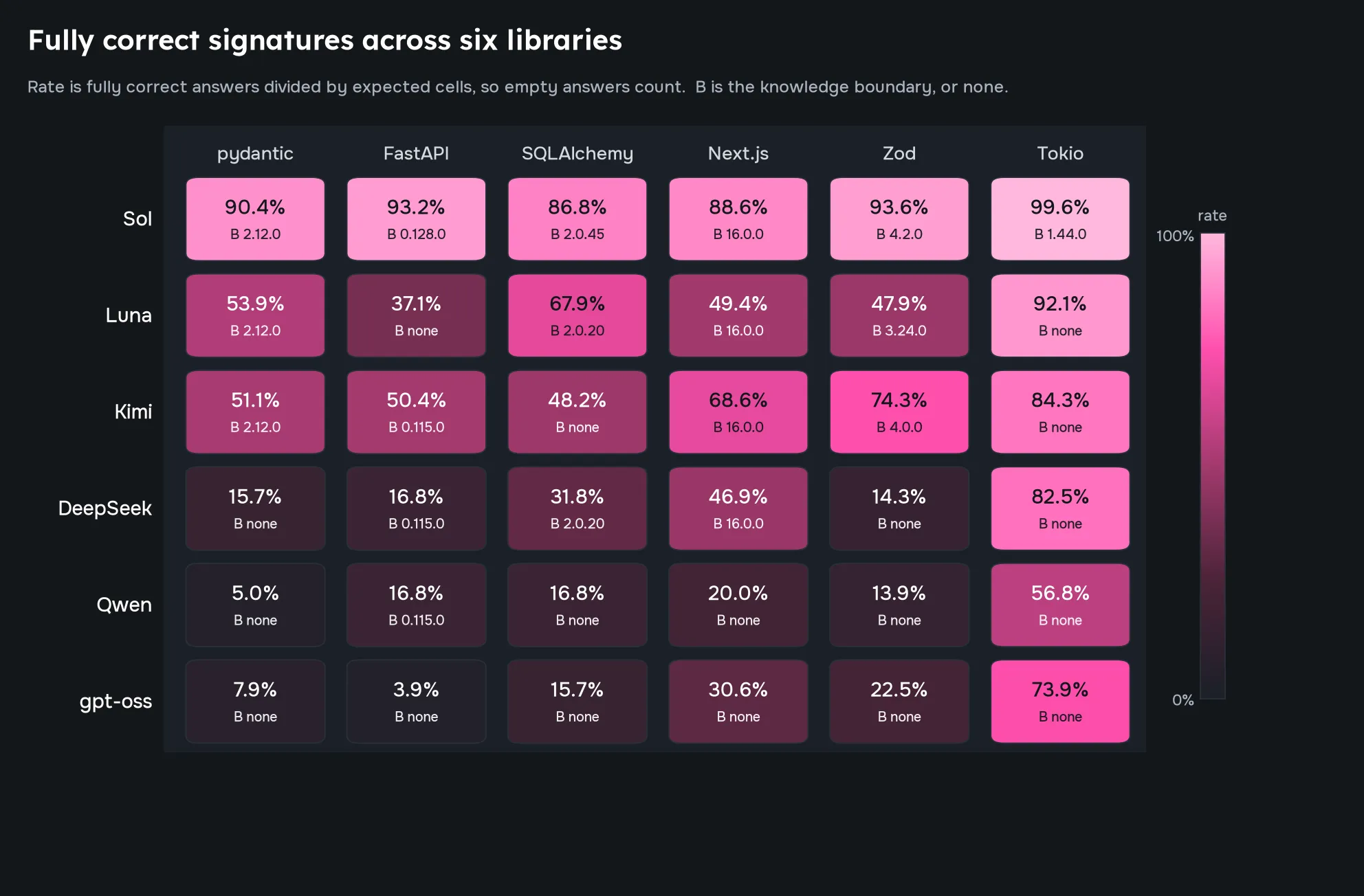
Sol scored highest on all six libraries. Its measured boundaries included pydantic 2.12.0, Next.js 16.0.0, SQLAlchemy 2.0.45, Zod 4.2.0, and FastAPI 0.128.0, all released in late 2025. It missed most of the signature changes we tested from 2026. On pydantic 2.14.0, Sol, Luna, DeepSeek, Qwen, and gpt-oss-120b each missed all eight changed signatures.
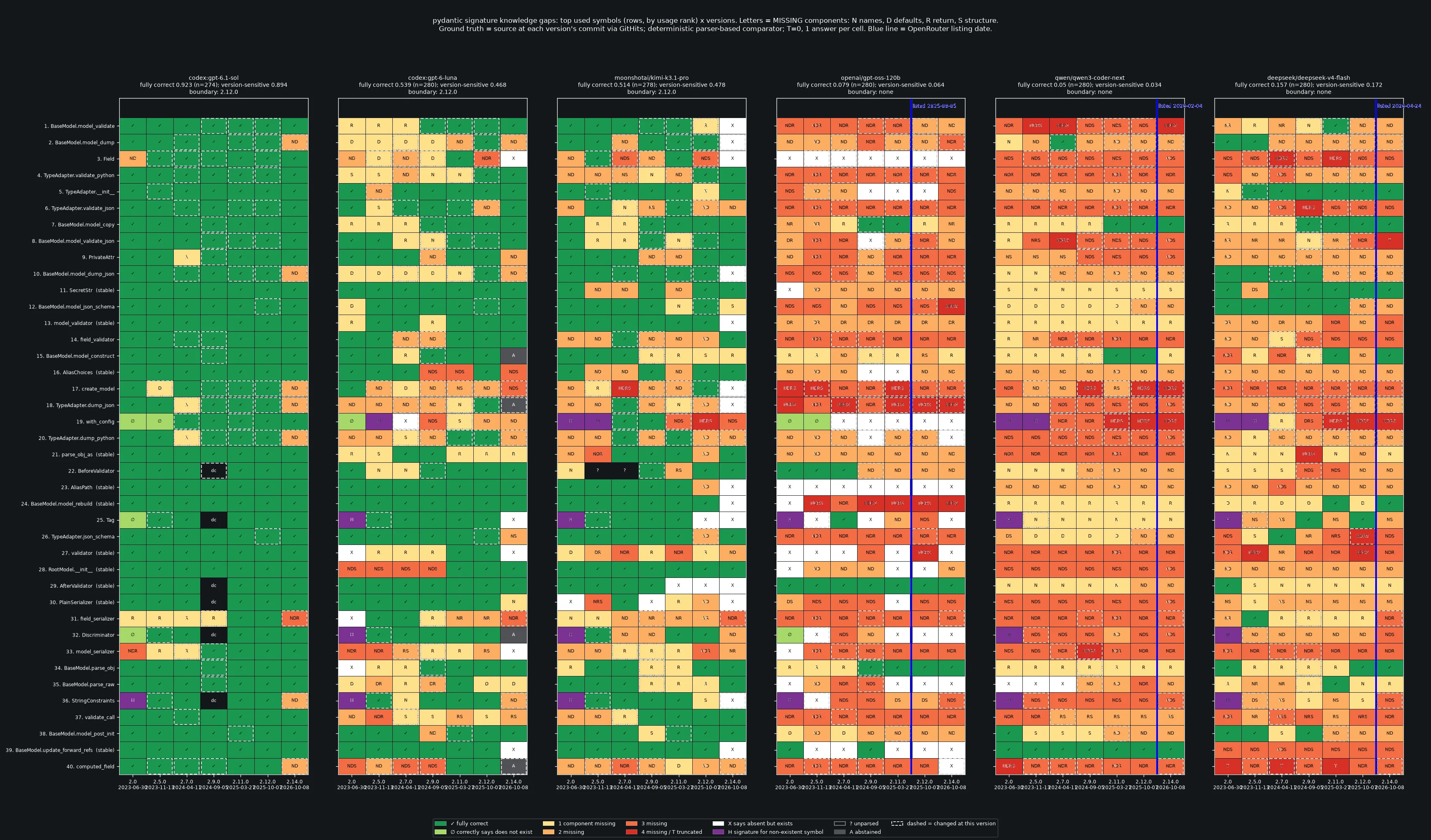
Luna and Kimi traded places depending on the library. Kimi scored higher on FastAPI, Next.js, and Zod. Luna scored higher on SQLAlchemy. Their results were closer on pydantic and Tokio. The tested Tokio APIs changed little across versions.
Older APIs caused problems too. DeepSeek, Qwen, and gpt-oss-120b often scored about 6% to 38% on unchanged signatures in pydantic, FastAPI, SQLAlchemy, and Zod. They did best on Tokio. A release date alone would not tell us whether these models could answer correctly.
Some models claimed an API did not exist. Others gave a signature from a different major version, such as answering a Zod 4 question with a Zod 3 definition.
Could the models use those APIs in code?
The first test named a function and asked the model to describe it. The coding test gave the model a task and a library version, then checked the API call it wrote. Here is a shortened example from DeepSeek on Next.js 16.0.0:
| Test | What we asked | What DeepSeek did |
|---|---|---|
| Describe the API | Give the signature of forbidden() in Next.js 16.0.0. | Correctly described a function with no arguments and return type never. |
| Write code | On an admin page, trigger Next.js’s built-in 403 Forbidden response when the user’s role is not admin. | Claimed that the API did not exist in 16.0.0 and called notFound() instead. |
The coding task asked for access denied (403). notFound() renders a not-found page (404). DeepSeek could describe the right function when we named it, but failed to choose it for the task.
We ran the same coding task with the function definition from GitHits in the prompt. DeepSeek then called forbidden(). These are the relevant lines from the two answers, shortened to show the difference:
// Without the GitHits excerpt
if (session.role !== 'admin') {
  notFound();
}

// With the GitHits excerpt
if (session.role !== 'admin') {
  forbidden();
}
We did this for 120 coding tasks, running each once without a GitHits excerpt and once with it. Of those tasks, 85 involved APIs that differed between versions and 35 involved APIs that stayed the same. We checked whether the targeted API existed in that version, whether the call used the required arguments, and whether it needed await. The percentages measure those API checks, not whether the whole application worked.
When should the workflow look up an API?
Could the signature test shown in the heatmaps above tell us when to skip GitHits? We used those measurements to try two rules. One used the model’s scores for the library version. The other checked whether the model had correctly described the specific API needed for the coding task. The chart compares these rules with always and never providing an excerpt:
| Chart label | When the workflow uses GitHits |
|---|---|
| Baseline | Never. Use the answer written without an excerpt. |
| Version-level gate | Use the model’s scores for the library version from the heatmap measurements to decide whether to skip the lookup. |
| Symbol-level gate | Skip the lookup if the model correctly described this specific API in the signature test. Otherwise, provide the excerpt. |
| Always-on GitHits | Always provide the excerpt before asking the model to write code. |
For the two selective approaches, we applied the lookup rule afterward and selected the corresponding answer from the two runs. We did not run the model four times. In the DeepSeek example, the rule based on the individual API would skip GitHits because the signature answer was correct. It would therefore keep the coding answer that called notFound().
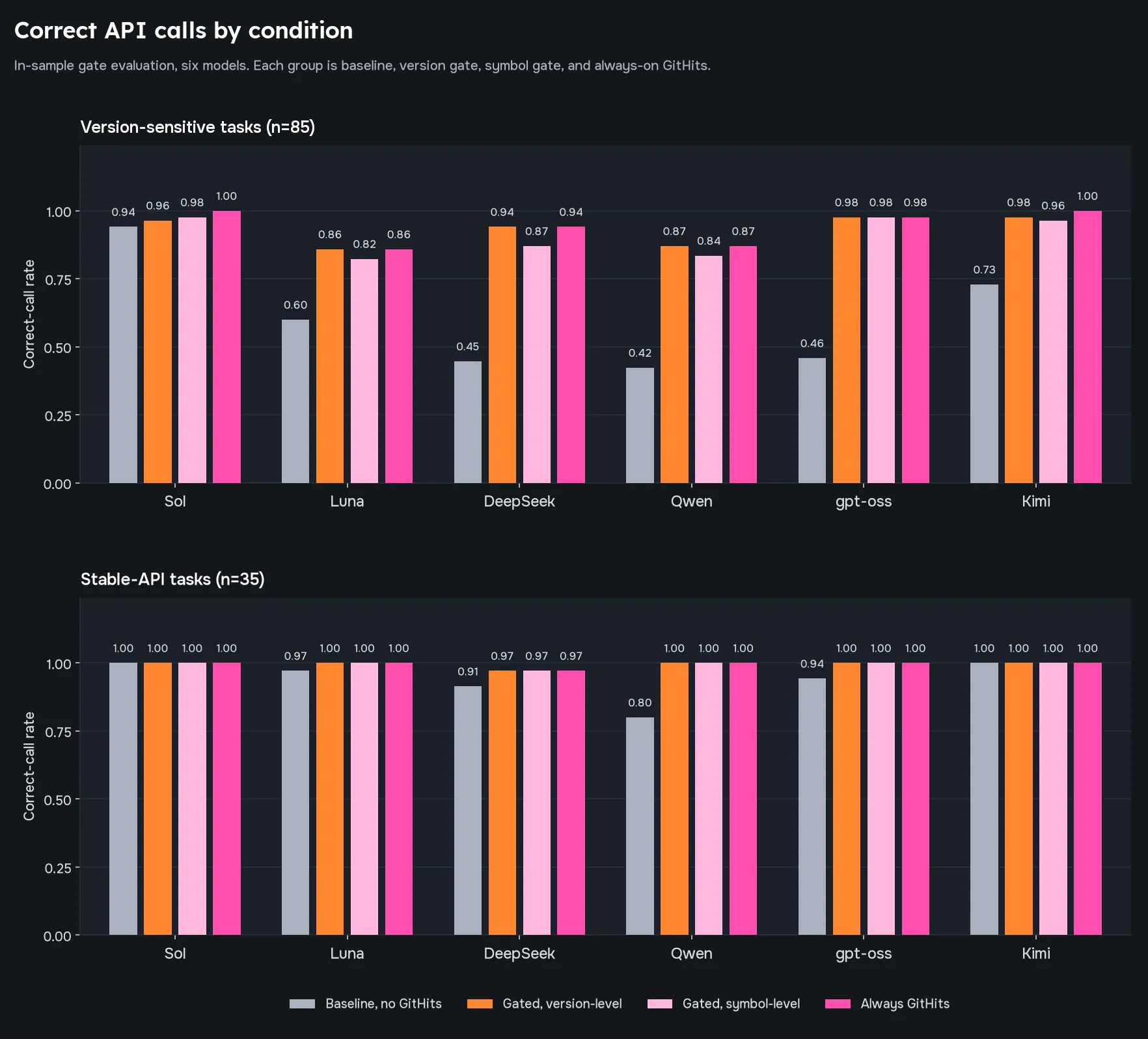
Providing the definitions improved correct API calls across all six models. The separate 173-task evaluation reported above tested whether that improvement held on new tasks.
We then tested the lookup rules on newer versions that had not appeared in the heatmap measurements. The rule based on library-version scores matched the accuracy of always using GitHits but saved only about 1% of lookups.
We also tried deciding from release dates alone. That rule skipped lookups despite incorrect model answers at a rate of 10–13%. The rule based on measured results saved little, and the date-only rule missed errors. These results support looking up the definitions for the version the agent is using.
What this means for agent workflows
Give the agent the API definitions for the library version your application uses. A familiar library name or an old release date is not enough to know whether the model will use it correctly.
In our new-task evaluation, providing definitions through GitHits raised correct calls from 59.9% to 93.7%. The model had the parameters and return types available while writing the code. That is the useful division of work: GitHits retrieves the version-specific information, and the model uses it to plan and make the change.
Try it
You can give your coding agent access to GitHits through MCP, or use the API to retrieve definitions within your own workflow.
- CLI + MCP: run
npx -y githits@latest init. The setup detects supported coding tools and configures the ones you select. Follow the setup guide for installation and sign-in. - API: follow the API quickstart to add GitHits reads to your agent workflow. The REST API is available for evaluation; the v1 contract is not finalized.
If you’re a software factory interested in using our API, we’d love for you to book a call with us to discuss what it would look like.
