
October 15, 2026 · 9 min read
An error root-cause agent using the GitHits API
We compared models with an agent that searches library source through the GitHits API and names the file and function that raised an error.
We built an error root-cause agent using the GitHits API. Code searches the library source at the pinned version, and the model names the file and function that raised the error. On 110 errors from GitHub issues, DeepSeek V4.1 Flash with GitHits and one retry scored 89.1%. That was higher than Codex without GitHits (84.8%) and comparable to Codex with a single GitHits call (91.2%). With the same retry, Codex scored 97.6%. DeepSeek’s mean model cost for that retry was $0.26 per 1,000 errors, compared with $2.11 for Codex without GitHits and $1.85 for Codex with a single GitHits call.
Gemma 4 31B, an open-weight model, scored 9.7% without GitHits and 83.0% with GitHits and the retry.
The task
A stack trace shows the error message. It often does not show which line in the library produced it, especially when the error comes from a version pinned years ago. That line is the raise site: the file and the function whose code creates the message. Finding it is the first step toward knowing whether the application called the library wrong, hit a bug, or needs an upgrade.
The agent receives the error message and the package at the version from the issue, written as ecosystem:package@version. It returns the source file, the function whose body raises the message, a one-sentence cause, and a one-sentence fix.
How the agent works
The agent is about 80 lines of Python. Code runs the searches. The model reads the returned source and answers.
- Search the library at that exact version for the full error message with the GitHits
/v1/grependpoint. That endpoint runs a text search over the files in one version. If the full message is missing, search for its longest fixed fragments. The search skips tests, build output,dist/directories,.d.tsdeclaration files, and minified files. - Read short excerpts around the top matches with the GitHits
/v1/readendpoint, which returns the source around a location in a file. - Pass the error and those excerpts to the model in one call.
- Run a self-check. If the excerpts are empty, or the file or function in the answer does not appear in them, the model proposes up to 2 new search patterns. Code runs those searches, and the model answers once more. The check uses only what an agent would have in production: what GitHits returned, and whether the answer appears in it. It does not see the answer key. It also cannot catch a wrong file or function that happens to appear in the excerpts. Over 3 runs, that happened 13 times for DeepSeek and 18 for Gemma.
Many error messages are built at runtime. The running code assembles the text from fixed words and values that change per call, so the full message is not stored in the source. missing destination name STATUS_ID in *[]models.TABLENAME is not in the sqlx source verbatim, but missing destination name is. The fragment search is there for those messages.
In an earlier version, code searched only for the full message. Gemma scored 57.6%. Adding the fragment search took it to 69.7%.
Sampling 3 answers and taking a majority vote cost three times as much and moved accuracy between -1 and +2 points. Added to the retry, it did not improve the result.
How we tested it
We took 110 errors from GitHub issues that name a pinned library version: 37 Python, 33 npm, 21 Go, and 19 Rust. 39 of them are runtime-built messages. We started with 111 and removed one Go error after review, because the linked issue showed that the reporter’s own code raised it, not the library. We located each raise site in the released source at that version with GitHits search, then reviewed every answer key by script and by hand. An answer counts as right only if both the file and the function match.
We ran Gemma 4 31B, DeepSeek V4.1 Flash with reasoning off, and Codex gpt-6.1-sol at low reasoning effort, all through OpenRouter, 3 runs per setup. Higher reasoning effort would likely raise Codex’s score without GitHits, and its model cost.
Accuracy and model cost
| Setup | Without GitHits | GitHits, single call | GitHits + retry |
|---|---|---|---|
| Gemma 4 31B | 9.7% ($0.04) | 69.7% ($0.10) | 83.0% ($0.16) |
| DeepSeek V4.1 Flash | 23.9% ($0.14) | 78.2% ($0.18) | 89.1% ($0.26) |
| Codex gpt-6.1-sol, low reasoning | 84.8% ($2.11) | 91.2% ($1.85) | 97.6% ($3.10) |
Accuracy is the share of 110 errors with the right file and function, averaged over 3 runs. The dollar figures are mean model cost per 1,000 errors. GitHits API fees are not included. The model answered errors in batches of 10, so the removed error’s cost can’t be separated out: costs, and the times below, come from the original runs over 111 errors.
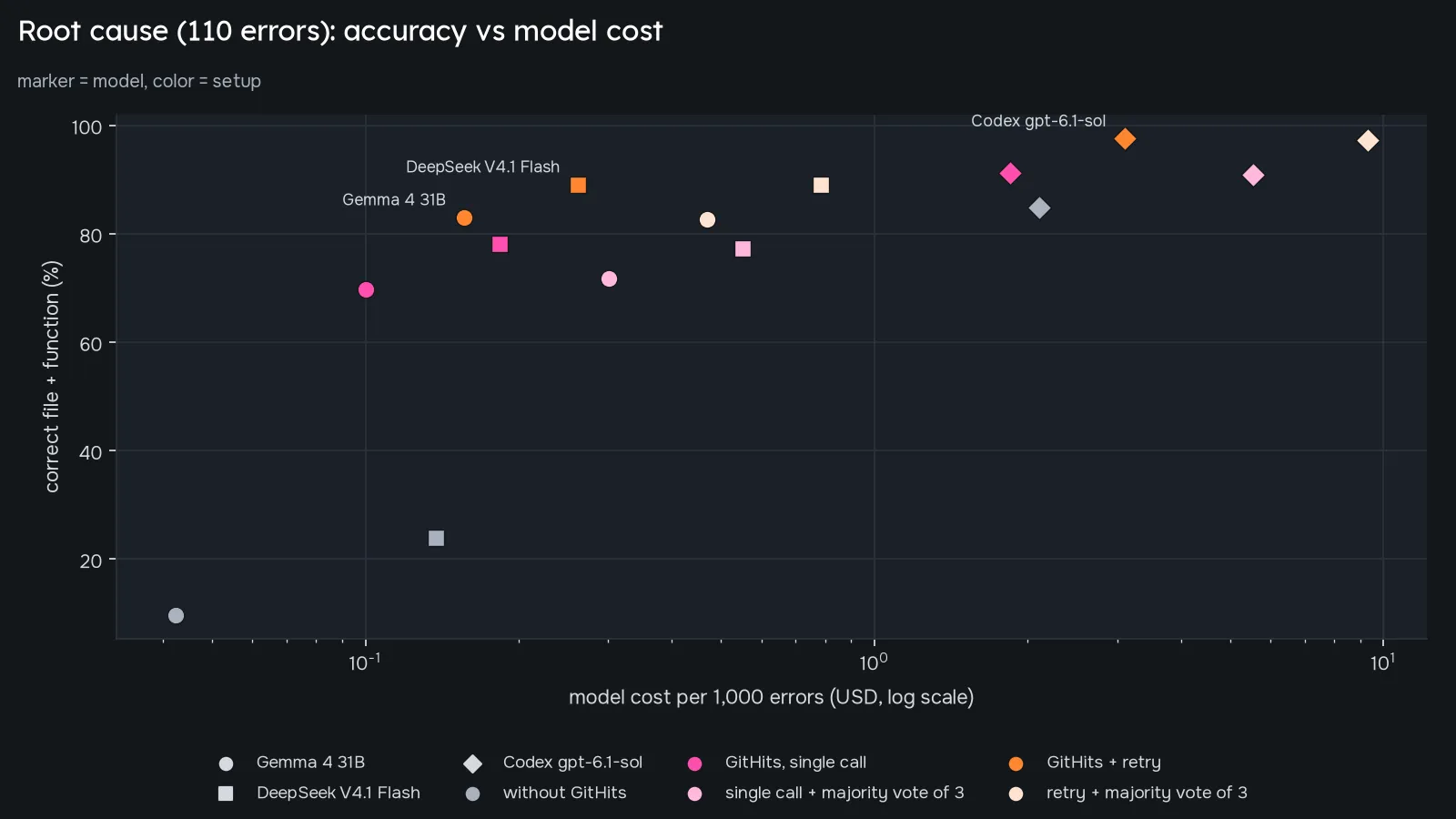
DeepSeek’s retry result was the same on all 3 runs: 98 of 110. Codex also spent less model time with GitHits: 76 seconds per run with a single GitHits call, against 235 seconds without. Those figures are model time only. GitHits search added a mean of 189 seconds per run.
Runtime-built messages
Most of the retry’s gain is on runtime-built messages. On those 39 errors, the first search often has nothing to match, so the model proposes something the source does contain: a fixed fragment, an error type name, or a pattern like func X. Across 3 runs, DeepSeek went from 60 correct out of 117 attempts with a single call to 96 with the retry, the same count as Codex with a single GitHits call.
Examples
The self-check fired on all 3 runs, and the retry was right every time, in these two cases:
- gin v1.6.3 (gin-gonic/gin#2423):
["…"] is not valid value for uuid.UUID. The first search came back empty. Gemma and DeepSeek both searched a shorter fragment, such asis not valid value for, and foundbinding/form_mapping.go:setByForm. - sqlx v1.3.5 (jmoiron/sqlx#915):
missing destination name STATUS_ID in *[]models.TABLENAME. The first search was empty. Searchingmissing destination nameled both models tosqlx.go.
These errors were wrong for every model on every run without GitHits, including Codex, and right on every run with it:
- reqwest 0.9.17 (seanmonstar/reqwest#530):
a parsed Url should always be a valid Uri. - knex 0.15.0 (knex/knex#2753):
Method implemented in the dialect driver. We tested knex 0.15.0. The issue was reported against a local knex 0.14.6, and both versions raise the error from the samedropForeignfunction.
On axios 1.1.3 (axios/axios#5286), maxContentLength size of …, Gemma and DeepSeek with GitHits were right on all 3 runs. Codex was right on none of the 3 runs, including with GitHits.
By language
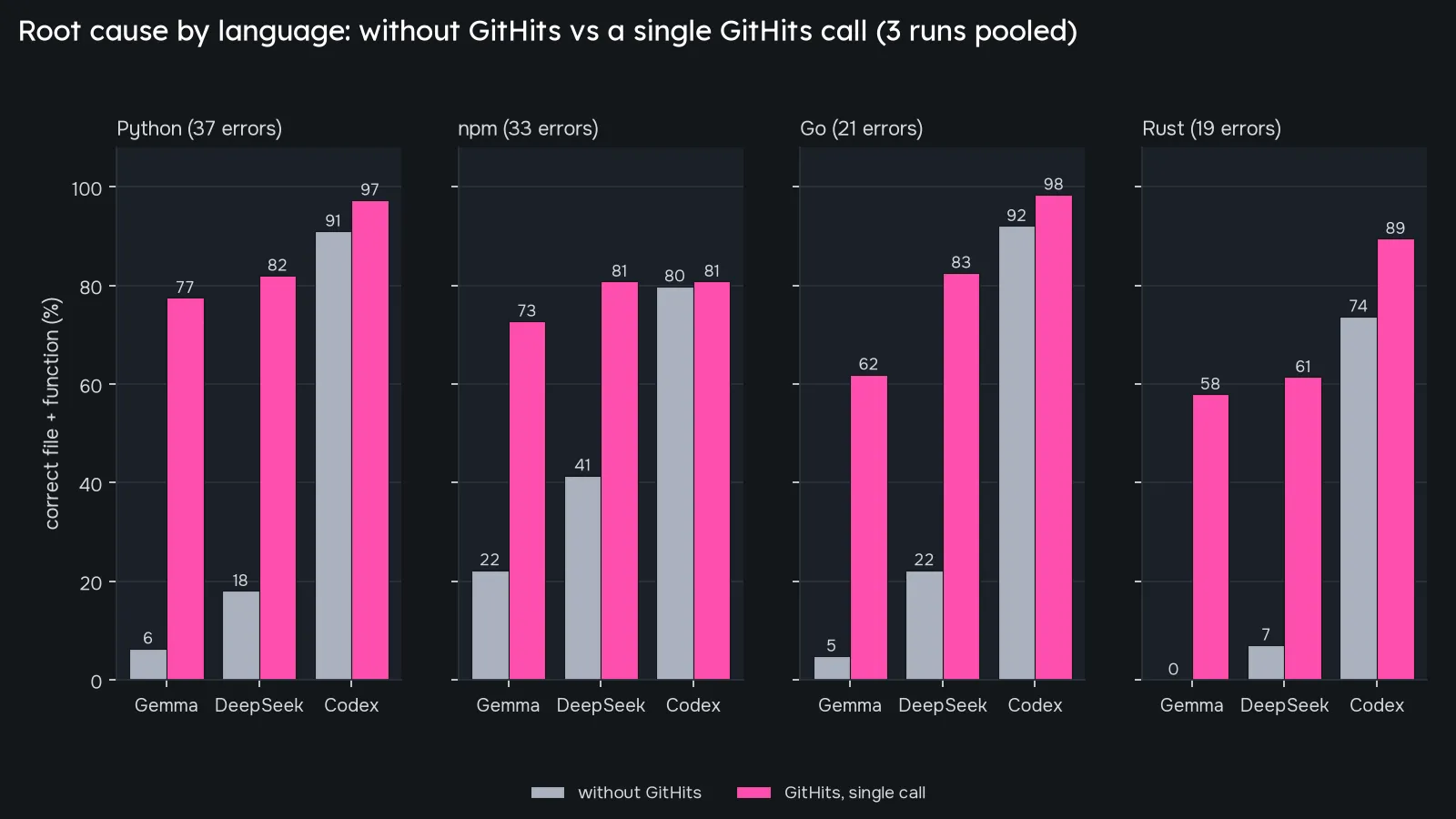
Each language group has 19 to 37 errors. Here is how the retry changed the counts, as correct answers out of all attempts across 3 runs:
| Language (errors) | Gemma: single → retry | DeepSeek: single → retry | Codex: single → retry |
|---|---|---|---|
| Python (37) | 86 → 93 /111 | 91 → 102 /111 | 108 → 111 /111 |
| npm (33) | 72 → 79 /99 | 80 → 86 /99 | 80 → 91 /99 |
| Go (21) | 39 → 59 /63 | 52 → 58 /63 | 62 → 63 /63 |
| Rust (19) | 33 → 43 /57 | 35 → 48 /57 | 51 → 57 /57 |
npm was the hardest language for Codex, with and without the retry, and Rust was the hardest for Gemma and DeepSeek. Published npm packages include compiled output, so the search skips dist/, .d.ts files, and minified files. We also count the source-repository path as a right answer when it differs from the path in the published package.
What we learned building more agents
This agent is one of about 15 specialized agents we built and measured on the GitHits API. The results followed a similar pattern across agents. GitHits raised accuracy most when the answer was a checkable fact that is hard to know from memory: an exact raise site in source, a release published after a model’s training cutoff, a security advisory, or a parameter default at a pinned version. It added little or nothing when the task was writing code, or when the API involved was widely known. In those tests, Codex scored about the same without GitHits as with it, and in one code-writing test it scored lower with GitHits (32 of 36 runs across 12 repositories, against 36 of 36 without).
Use the GitHits API
This agent uses two endpoints: /v1/grep, which searches the files of one library version, and /v1/read, which returns the source around a location in a file. In this agent, code chooses the searches and the model reads the results. The REST API is available for evaluation, with the base URL https://api.githits.dev/v1; the v1 contract is not yet finalized.
- Get access: create an API token in the token settings of your GitHits account and send it in an
Authorization: Bearerheader. The authentication guide covers token storage for CI and runtime use. - First request: the API quickstart shows how to call an endpoint.
- Reference: the API overview links to the v1 reference for every endpoint, and the API playground lets you send test requests with your token.
If you’re a software factory interested in using our API, we’d love for you to book a call with us to discuss what it would look like.
