
October 22, 2026 · 9 min read
Helping a coding agent check changes across repositories
A change in one project can break another. We tested how agents handle 42 tasks with source access through GitHits, local clones, or neither.
A coding agent renames a class in your project. The change looks complete in that repository, but another project still imports the old name. To spot the break before it ships, the agent needs to find the code that uses the class.
The same problem comes up during upgrades. When a dependency changes, the agent may need to read both projects to understand how your code should adapt. Having one repository open gives it only part of the picture.
We tested 42 tasks involving related public repositories. Four models tried each task with no access to the other projects, with source access through GitHits, and with local copies of all the related repositories. Access to source made a large difference. Across the models, average pass rates rose from 9–53% without that access to 79–94% with either GitHits or local copies.
The task
A coding agent often works in a sandbox, an isolated environment containing the project it is editing. We compared two ways to give it the related source: clone the other repositories into that environment, or read them through the GitHits API. We also tested what happened when the agent had neither option.
The API can read public repository source at a chosen Git reference, or ref. A ref identifies a release tag, a branch, or a particular commit. A commit ID fixes the exact revision being read, including changes that haven’t reached a release yet. One task used an unreleased pytest revision this way.
The agent can list directories, search for text patterns, read files, and compare revisions through GitHits. Our experiment supplied the related repositories and the versions to inspect.
We gave the agent three kinds of tasks:
- Update code after a dependency changes (10 tasks). Each task comes from a real fix. For example, aiobotocore needs to adapt its handling of S3 region redirects when it upgrades botocore from 1.43.98 to 1.43.101. The agent must compare those versions and make the corresponding edit.
- Will my change break other repositories? (16 tasks). For example, a developer is about to rename
aiobotocore.session.AioSessiontoAsyncSession, with no alias, and asks whether that breaks any other repository at its pinned version, and where. The answer is yes:s3fs/core.pyconstructsAioSession. Two of the 16 changes break nothing. - Find where a function or class is used (16 tasks). For example, which production files use
run_syncfromjupyter_core.utils? Matching the name alone can give the wrong answer:jupyter_servercalls a differentrun_sync, imported from anyio. The agent needs to follow the imports too.
How the agent works
The agent runs a loop of up to 10 turns. In each turn, the model asks for up to 4 tool calls or gives its final answer. It has three tools for its own repository: list, search and read. It has four tools for the other repositories:
- List a directory, with
/v1/list. - Search for a text pattern, called a regular expression, across one or more repositories at their chosen revisions, with
/v1/grep. - Read lines of a file, with
/v1/read. - Compare two revisions with
/v1/code/diff. The returned diff shows the lines added or removed between them.
Each repository has an identifier such as github:boto/botocore@1.43.101, which specifies its host, owner, name, and revision. The agent could also use GitHits search to look for code by meaning. Nearly all its requests to other repositories were text searches and file reads.
In the cloned setup, the same four tools run git ls-tree, git grep, git show and git diff on local clones. The prompts, the turn limits and the tools for the agent’s own repository are identical across setups.
How we tested it
We used 29 public Python repositories in five groups of related projects: pytest, pluggy and eight pytest plugins; botocore, boto3, s3transfer, aiobotocore and s3fs; httpcore, httpx, starlette, FastAPI, respx and uvicorn; five Jupyter repositories; and kombu, celery and py-amqp. Each repository is pinned to a commit or release tag.
For the update tasks, the agent starts at the commit immediately before the real fix. We check whether its edit contains the expected code patterns and remains valid Python syntax. The original fix passes these checks and the preceding version fails them. We didn’t run the projects’ test suites, so a pass here doesn’t establish that the edit works in a running application.
For the impact and usage questions, we searched the chosen revisions with git grep and checked the answer key by hand. We scored the returned file lists using F1, which balances finding the relevant files against including unrelated ones. A perfect list scores 1; we required at least 0.6. Impact answers also had to give the correct verdict on whether the change would break another project.
We ran Gemma 4 31B at its default settings, DeepSeek V4.1 Flash and Kimi K2.6 with reasoning off, and Codex gpt-6.1-sol at low reasoning effort. Each model ran every task three times in each setup, 1,512 runs in total. All three setups ran in the same afternoon, with runs in random order within each repeat, so they shared the same API and model-provider conditions.
Tasks passed
The table shows the average share of tasks passed over three runs. Brackets give the lowest and highest run:
| Model | No access to other repos | GitHits API | All repos cloned |
|---|---|---|---|
| Gemma 4 31B | 9% (5–12) | 79% (74–83) | 79% (71–83) |
| DeepSeek V4.1 Flash | 16% (14–19) | 92% (90–93) | 94% (93–95) |
| Kimi K2.6 | 19% (17–21) | 94% (93–95) | 94% (93–95) |
| Codex gpt-6.1-sol | 53% (48–60) | 94% (93–95) | 94% (93–95) |
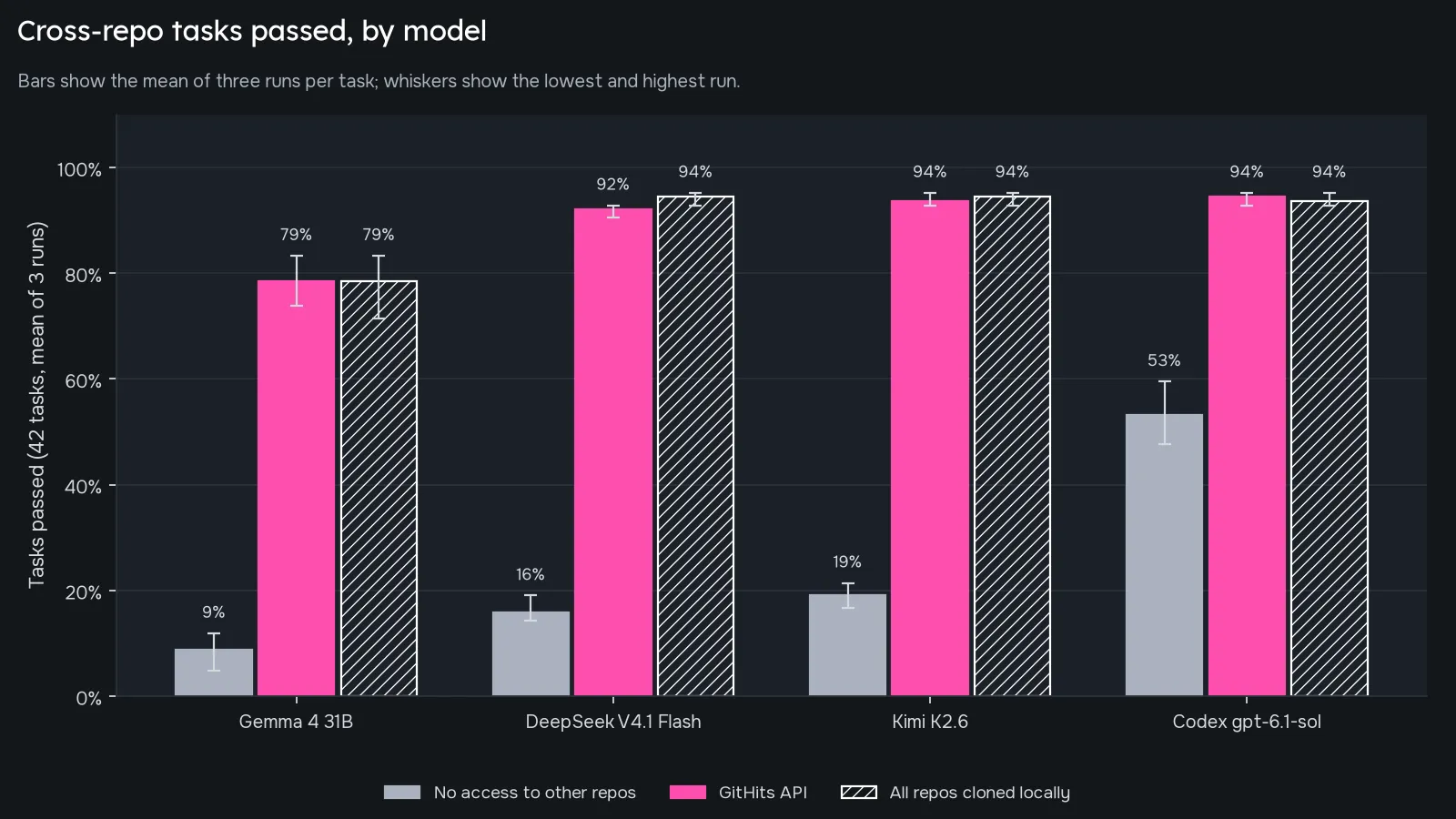
One task is about 2.4 points of a single run. The largest gap between GitHits and clones was DeepSeek’s, at one task on average, in favor of clones. Gemma’s results varied the most between repeats: in individual repeats, GitHits was 5 tasks ahead in one and 4 tasks behind in another. With three runs per task, the data does not show either setup ahead.
Without access to the other repositories, Codex passed 53%. These are popular public projects, so the result may partly reflect information learned during training.
By task type
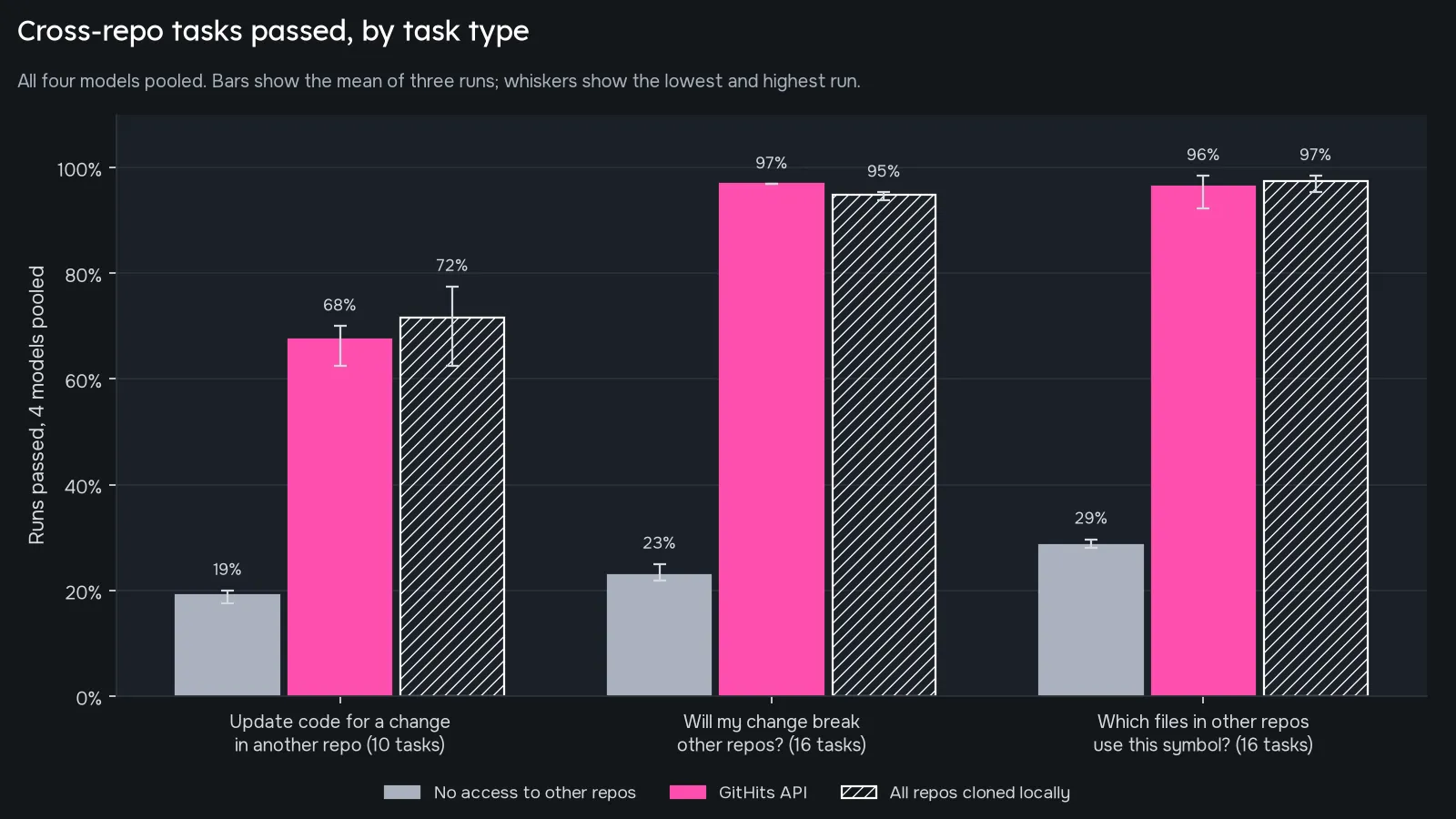
The impact and usage questions mostly require finding where a function or class is used. With read access through GitHits or local copies, models passed 95–97% of those tasks. Without access, they passed 23–29%.
Updating code was harder: models passed 68% of those tasks through GitHits, 72% with local copies, and 19% without access. Local copies came out ahead for every model on this task type, by one or two of each model’s 30 attempts. Across the three repeats, the combined results overlap: 62–70% through GitHits and 62–78% with local copies. We can’t separate the difference from variation between runs.
One task involved adapting pytest-xdist to an unreleased pytest change. Both setups read the same exact commit. The task passed in 9 of 12 runs through GitHits and 9 of 12 with local copies.
Cost and setup
Mean model cost per 1,000 tasks, for the two setups with access to the other repositories:
| Model | GitHits API | All repos cloned |
|---|---|---|
| Gemma 4 31B | $2.07 | $2.05 |
| DeepSeek V4.1 Flash | $2.09 | $1.83 |
| Kimi K2.6 | $16.11 | $13.43 |
| Codex gpt-6.1-sol | $23.02 | $23.19 |
The costs are model spend reported by OpenRouter. GitHits API fees are not included. Codex ran through a ChatGPT subscription, so its figures are estimates at OpenRouter list price, based on our own transcript sizes and excluding the instructions added by the Codex runner. Model cost was about the same for Gemma and Codex, and higher with GitHits for DeepSeek and Kimi.
The local copies of the 29 repositories used about 435 MB of disk. Providing those copies is additional setup for each sandbox that needs them, unless the surrounding system shares or caches them. GitHits let the agent read the same external source without storing those repositories in its sandbox.
Across all four models, both approaches passed 90% of tasks. The differences for each model fell within the variation between repeated runs. In this experiment, GitHits was a practical alternative to preparing local copies of every related repository. The results don’t establish that either approach is more accurate.
Use the GitHits API
This agent uses four endpoints: /v1/list, /v1/grep and /v1/read to browse, search and read other repositories at a pinned ref, and /v1/code/diff to compare two refs of a repository. The REST API is available for evaluation, with the base URL https://api.githits.dev/v1; the v1 contract is not yet finalized.
Before renaming aiobotocore.session.AioSession, an agent can check the other repositories at their pinned commits in one request:
curl -s https://api.githits.dev/v1/grep \
  -H "Authorization: Bearer $GITHITS_API_TOKEN" \
  -H "Content-Type: application/json" \
  -d '{
    "pattern": "AioSession\\(",
    "targets": [
      {"target": "github:fsspec/s3fs@17a38ae9dc6ff4df64a338d69e26712c152a36ff",
       "corpus": "source", "path_selectors": [{"kind": "glob", "value": "s3fs/*.py"}]},
      {"target": "github:boto/boto3@65340debb6393c434f864f86245c46aad08ab3fe",
       "corpus": "source", "path_selectors": [{"kind": "glob", "value": "boto3/**/*.py"}]}
    ]
  }'
{
  "hits": [
    {"target_index": 0, "file_path": "s3fs/core.py", "line": 325,
     "line_content": "For example: aiobotocore.session.AioSession(profile='test_user')"},
    {"target_index": 0, "file_path": "s3fs/core.py", "line": 665,
     "line_content": "self.session = aiobotocore.session.AioSession(**self.kwargs)"}
  ],
  "targets": [
    {"target_index": 0, "target": "github:fsspec/s3fs@17a38ae9dc6ff4df64a338d69e26712c152a36ff", "traversal": "complete"},
    {"target_index": 1, "target": "github:boto/boto3@65340debb6393c434f864f86245c46aad08ab3fe", "traversal": "complete"}
  ],
  "traversal": "complete",
  "total_matches": 2
}
Both targets were searched completely. Line 665 of s3fs/core.py is the constructor call the rename would break; line 325 is the same name in a docstring. boto3 has no matches. Each hit also carries a read action to pass to /v1/read for the surrounding lines.
- Get access: create an API token in the token settings of your GitHits account and send it in an
Authorization: Bearerheader. The authentication guide covers token storage for CI and runtime use. - First request: the API quickstart shows how to call an endpoint.
- Reference: the API overview links to the v1 reference for every endpoint, where you can send test requests with your token.
If your agents need to check changes across public repositories, book a call to discuss integrating the API into your workflow.
