
November 6, 2026 · 9 min read
Agent37 and Daytona: running coding jobs in cloud sandboxes
We tested Agent37 and Daytona with the same jobs to compare running costs, startup time, sleep, and what happens when a sandbox runs out of memory.
A coding agent needs somewhere to run the code it changes. A cloud sandbox gives it a separate machine for that work: a place to download a project, build it, and run tests. When the job finishes, the machine can be deleted. Between steps, it can sleep while the agent waits for a review or another response.
For a team running many jobs, the choice of sandbox affects both cost and recovery from failures. A low hourly price helps while the machines are busy. Quick startup helps short jobs. If a large build restarts the whole machine, the agent may have to repeat its work.
We compared Agent37 and Daytona in the US on November 3 and 4, 2026, using jobs with matching requests for processor cores, memory, and disk space. We created 384 sandboxes for the main tests, made 375 more creation requests in bursts, and kept one sandbox per provider for about a day. The jobs ran without a language model so time spent waiting for a model would not obscure the machine measurements.
Agent37 had lower running costs. Daytona returned new sandbox creation requests faster and had a lower storage rate while stopped. Memory limits and waking from sleep produced differences that matter when choosing between them.
The sandbox types we tested
We tested Daytona’s standard sandbox against three Agent37 types:
| Agent37 type | How it runs |
|---|---|
| Default | Shares processor cores with other sandboxes on the host machine. |
| Performance | Reserves processor cores, at four times the default compute rate. |
| VM | Runs with its own operating-system kernel, the part that manages processes, memory, and devices. |
We requested two machine sizes for each type. Matching the requested resources let us compare the same jobs, though the tests also found cases where the resources provided differed from the request.
Running costs
Using the list prices recorded for the experiment, a Daytona sandbox cost about 6.6 to 6.7 times as much per running hour as Agent37’s Performance type of the same size. Performance is the type whose processor use stayed steady like Daytona’s. It completed 89% to 93% as much work in its slowest interval as in its fastest, and Daytona about 93%. The default type shares processor cores and is cheaper still. A Daytona sandbox cost about 24 to 25 times as much per running hour as an Agent37 default sandbox of the same size, but that type’s processor use varied more. It completed about 63% to 68% as much work in its slowest interval as in its fastest. These calculations exclude plan fees and credits.
The 96 jobs tested on each provider’s default type cost an estimated $0.051 on Agent37 and $1.54 on Daytona. Daytona’s jobs used 6.1 sandbox-hours, compared with Agent37’s 4.3. Most of the extra time went to full clones. Clone time depended on GitHub as well as the sandbox, so we did not attribute it to either provider. A sandbox-hour is one sandbox running for an hour; ten sandboxes running for six minutes also total one sandbox-hour.
Agent37 rounds each sandbox’s usage up to whole minutes. For the 325 sandboxes whose billing records we checked, it charged $0.4835 against our estimate of $0.4849. Daytona’s figures are estimates calculated from the recorded durations and its per-second list prices; we did not check individual Daytona charges.
Creating a sandbox and running the first command
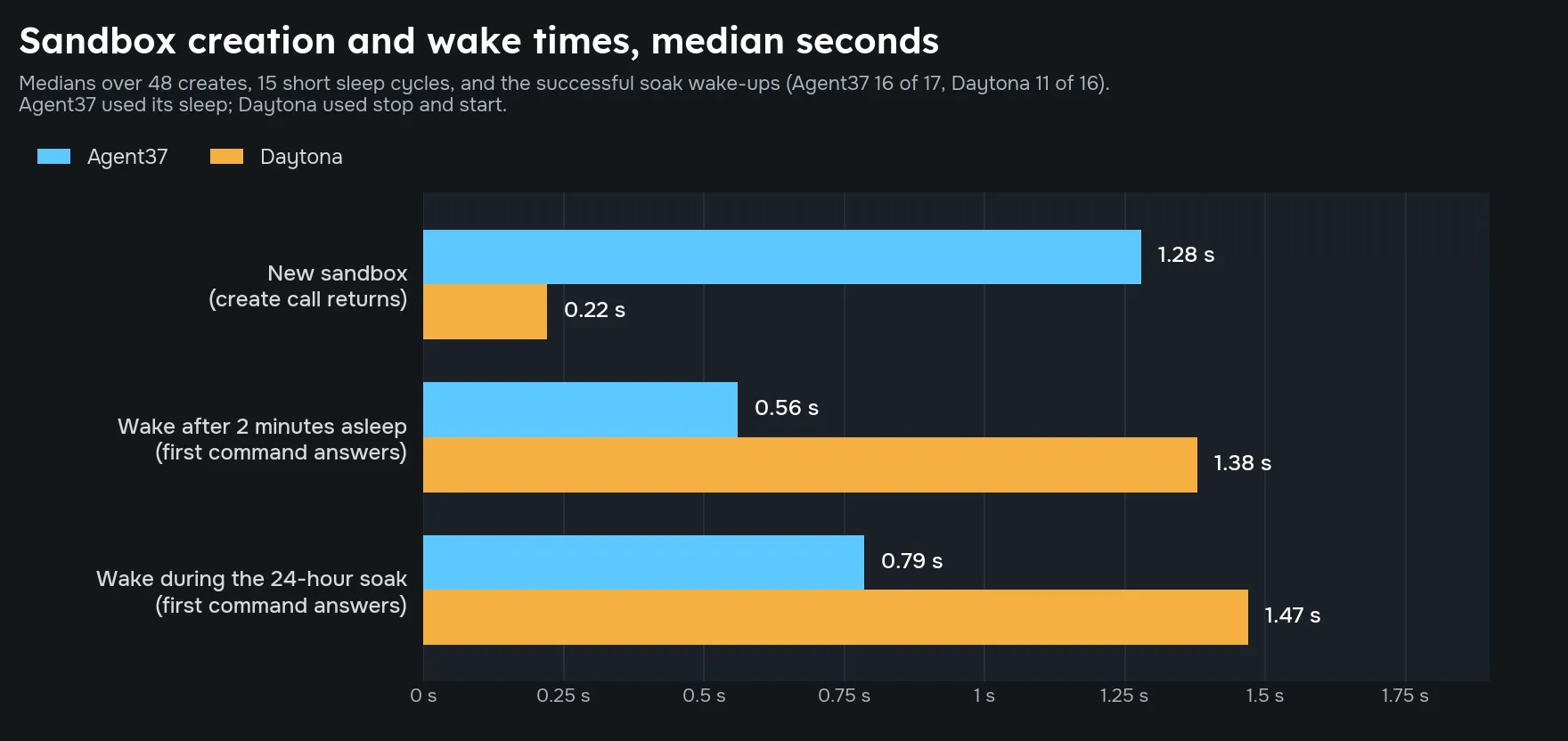
Daytona’s creation request returned in a median of 0.22 to 0.26 seconds across the two sizes. Agent37 took 1.17 to 1.28 seconds across its types and sizes. The median is the middle measurement: half the observations are faster and half are slower.
Returning from creation and answering a command are separate steps. After creation, the first command took another 0.28 to 0.46 seconds across the tested configurations.
We also sent creation requests in groups of up to 45 at once. All 320 requests across both providers succeeded. At 45 simultaneous requests, Agent37’s median creation time was 1.8 to 2.0 seconds; Daytona’s was about 0.4 seconds.
Our Agent37 account had a limit of 50 running sandboxes. When we sent 55 requests together, 52 succeeded and 3 were rejected. One sandbox from the day-long test was already running, bringing the total to 53. A system using that account limit to control spending would need to account for the extra instances admitted during simultaneous requests.
Sleeping between steps
Sleeping releases computing resources while keeping files for the next step. We used Agent37’s sleep operation and Daytona’s stop/start operations.
Across 15 cycles per provider, with two minutes asleep each time, the first command after waking answered in a median of 0.56 seconds on Agent37 and 1.38 seconds on Daytona. A file written before sleep survived every cycle on both.
Running programs behaved differently from files. In 12 process checks per provider, no background process survived. A background process might be a test server or a program watching files for changes. The workflow needs to restart those programs after waking. Agent37’s documentation also says memory contents are not guaranteed to survive.
The chart compares creation requests with time to answer a command after waking. Those are the separate measurements described above.
Leaving a sandbox asleep for a day
We kept one sandbox per provider for about 24.5 hours and scheduled a wake-up every 30 minutes. Each wake-up ran a command that read a file written at the start.
The machine coordinating the experiment paused overnight. That left gaps of 11.6 to 12.5 hours and 3.5 to 4.5 hours without wake attempts. Both sandboxes remained asleep through the gaps. We recorded 17 wake attempts on Agent37 and 16 on Daytona.
This tested one sandbox per provider, so it shows what happened in that run and is not a reliability comparison.
| Result | Agent37 | Daytona |
|---|---|---|
| Successful wake and command | 16 of 17 attempts | 11 of 16 attempts |
| Median response time on successful attempts | 0.79 seconds | 1.47 seconds |
| Original file present after a successful wake | 16 of 16 | 11 of 11 |
Agent37 had one command timeout and two timeouts when asked to sleep.
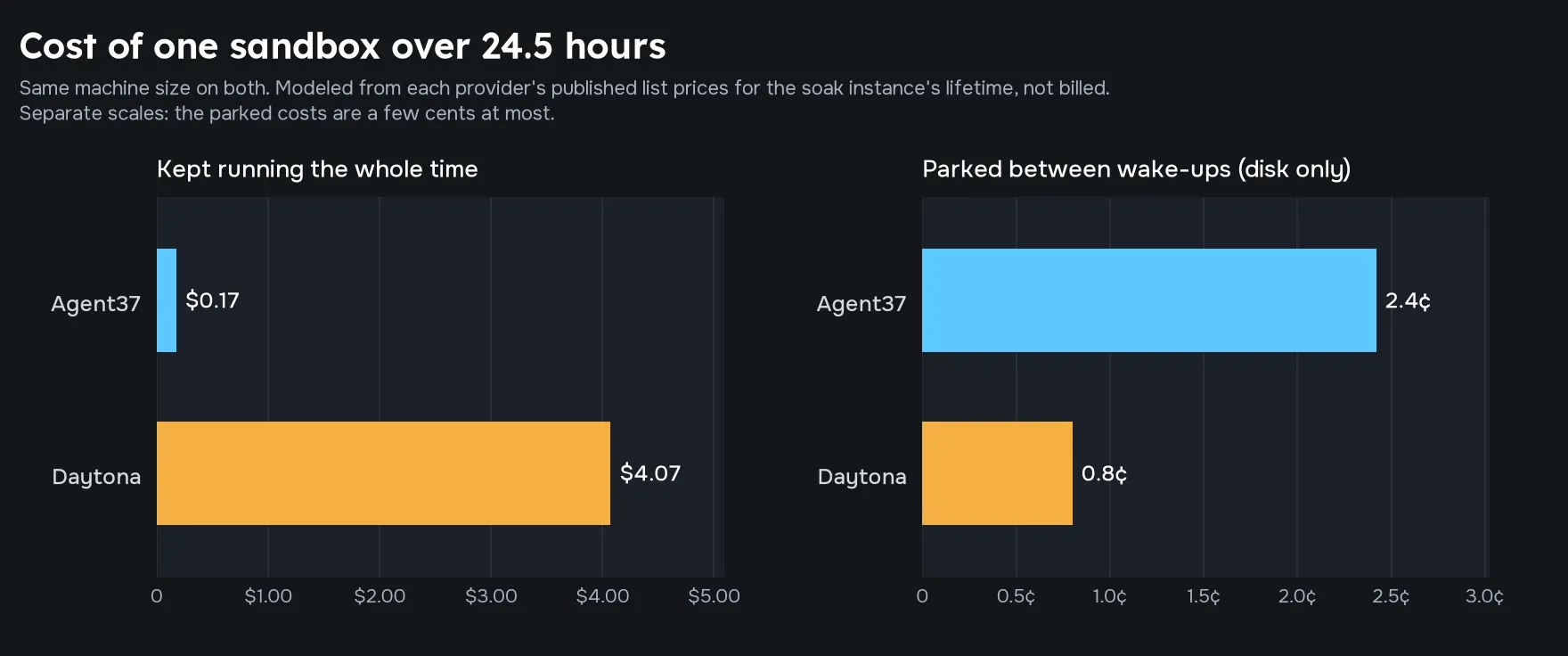
Using each provider’s storage-only rate, we estimated the day at 2.4 cents on Agent37 and 0.8 cents on Daytona. Keeping the same sandbox running throughout would have cost about $0.17 and $4.07 respectively. The chart shows these estimates, rather than charges taken from a bill. Its “parked” category means the sandbox was retained while idle.
Processor load and memory limits
To measure sustained processing speed, we kept every processor core busy for three minutes. We then compared the work completed in the slowest five-second interval with the fastest interval.
Agent37’s default type completed about 63% to 68% as much work in its slowest interval as in its fastest. Its Performance type stayed at 89% to 93%, and Daytona at about 93%. The reserved-core option reduced the variation we saw on Agent37’s shared cores.
We also ran a process that tried to use more memory than the sandbox had. Daytona and Agent37’s Performance and VM types stopped that process while keeping the sandbox running. Agent37’s default type let it exceed the stated limit slightly, then restarted the whole sandbox in 4 of 5 tests on the smaller size and 1 of 5 on the larger size. Those restarts erased temporary files.
For builds close to the memory limit, that difference determines how much work the agent has to repeat. A failed process can be rerun; a restarted sandbox may need its working files restored first.
Disk capacity matched our requests except on Agent37’s VM type, which provided about 10.4 GB at both sizes. The smaller VM did not enforce the 8 GB we requested.
Copying large repositories
A clone downloads a Git repository. A full clone includes its history, while a shallow clone can fetch just the latest commit. We cloned Next.js, PyTorch, and Kubernetes while 40 to 50 sandboxes were running at once on each provider.
| Sandbox type | Median full-clone time across the two sizes |
|---|---|
| Agent37 default | 121–174 seconds |
| Agent37 Performance | 90–104 seconds |
| Daytona standard | 510–527 seconds |
| Agent37 VM | 674–677 seconds |
Shallow clones took 23 to 35 seconds across the tested configurations.
Full clones depend on both the sandbox and the service sending the repository. GitHub may limit many simultaneous downloads from a shared network address. That could explain part of the difference, but we did not isolate the cause. Measure repository downloads at the number of simultaneous jobs your own workflow runs before using these timings to estimate job duration.
Choosing for the work your agents do
In these tests, Agent37’s lower running price favored jobs that keep sandboxes busy. Its Performance type also avoided the processor dips and whole-sandbox restarts seen on the default type. Daytona returned creation requests faster and cost less while stopped, which matters for workflows that keep many machines idle between steps.
The day-long test used one sandbox per provider, so it shows what happened in that run and is not a reliability comparison. On both, the files survived successful wakes and the background processes did not. A workflow should save work to disk and restart its services when resuming.
For jobs that only need to inspect an open-source dependency, an agent can use GitHits to retrieve the relevant source without downloading the whole repository. Our source-reading walkthrough shows that workflow.
